dncsoftware.com 1.805.383.2492 support@dncsoftware.com
Home > RS232 Pin Connection Reference Diagrams
Use this page as a reference if making your own cables or for checking existing cables. It is not always necessary to make your own cable, you can buy pre-made cables from us for all CNC machine tools.
Tips: Never connect a CNC's serial port to a parallel (printer) port or to a
network port.
If computer lacks serial port, a USB to serial port adapter may be used.
Configurations shown are the most commonly implemented, we are not trying to
imply that alternative configurations will not work.
For assistance with your application, please call 1-805-383-2492.
Note: Diagrams are for reference use only.
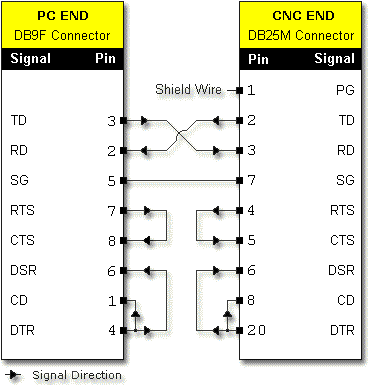
Figure 1. DB9F to DB25M, NULL Modem (Crossover)

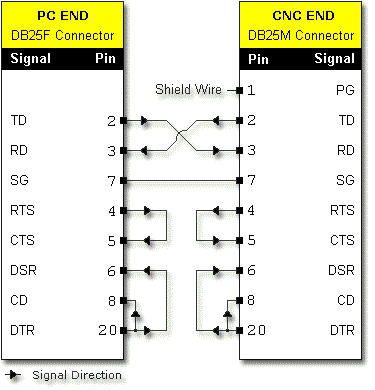
Figure 2. DB25F to DB25M, NULL Modem (Crossover)

Figure 3. DB9F to DB25M, Straight
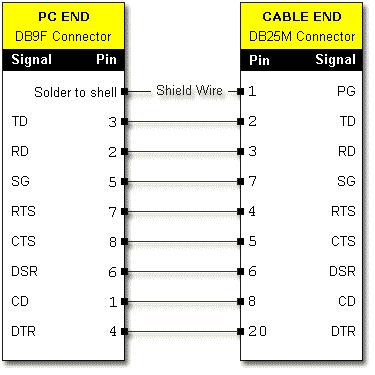
(Yes, pins 2 and 3 are crossed, but it's still a straight connection because
TD is connected to TD...)

Figure 4. RS232C PC Pin Assignments
Actual male connector on chassis of PC
| Pin (DB9) | Signal Function | Label | I/O Type |
| 1 | Carrier Detect | CD | Input |
| 2 | Receive Data | RD | Input |
| 3 | Transmit Data | TD | Output |
| 4 | Data Terminal Ready | DTR | Output |
| 5 | Signal Ground | SG | --- |
| 6 | Data Set Ready | DSR | Input |
| 7 | Request to Send | RTS | Output |
| 8 | Clear to Send | CTS | Input |
Figure 5. RS232C PC Pin Assignments
Actual male connector on chassis
of PC
| Pin (DB25) | Signal Function | Label | I/O Type |
| 1 | Protective Ground | PG | --- |
| 2 | Transmit Data | TD | Output |
| 3 | Receive Data | RD | Input |
| 4 | Request to Send | RTS | Output |
| 5 | Clear to Send | CTS | Input |
| 6 | Data Set Ready | DSR | Input |
| 7 | Signal Ground | SG | --- |
| 8 | Carrier Detect | CD | Input |
| 20 | Data Terminal Ready | DTR | Output |
Figure 6. RS232C CNC Pin Assignments
Actual female connector on cabinet
of CNC
| Pin (DB25) | Signal Function | Label | I/O Type |
| 1 | Protective Ground | PG | --- |
| 2 | Transmit Data | TD | Output |
| 3 | Receive Data | RD | Input |
| 4 | Request to Send | RTS | Output |
| 5 | Clear to Send | CTS | Input |
| 6 | Data Set Ready | DSR | Input |
| 7 | Signal Ground | SG | --- |
| 8 | Carrier Detect | CD | Input |
| 20 | Data Terminal Ready | DTR | Output |
Figure 7. DB25 to EIA/TIA 561 (RJ45) Modular Adapter (PC or CNC
Side)
Use to send RS232 over EIA/TIA 568A CAT5 Ethernet cable.
Add separate NULL modem adapter (Radio Shack Cat # 26-1496) to
this adapter on CNC side.
NEVER use modular adapter to connect a DB serial port to a 10BaseT Ethernet
network port!
ALWAYS use modular adapters in pairs!
| DB25 Pin Hole | Wire Color | RJ45 Pin |
| 1 |
--- |
--- |
| 2 | Green | 5 |
| 3 | Yellow | 6 |
| 4 | White* | 8 |
| 5 | Brown | 7 |
| 6 | Blue | 1 |
| 7 | Red | 4 |
| 8 | Orange | 2 |
| 20 | Black | 3 |
*Or Gray
Figure 8. DB9 (DE9) to EIA/TIA 561 (RJ45) Modular
Adapter (PC Side)
Use to send RS232 over EIA/TIA 568A CAT5 Ethernet cable.
NEVER use modular adapter to connect a DB serial port to a
10BaseT Ethernet network port!
ALWAYS use modular adapters in pairs!
| DB9 Pin Hole | Wire Color | RJ45 Pin |
| 1 | Orange | 2 |
| 2 | Yellow | 6 |
| 3 | Green | 5 |
| 4 | Black | 3 |
| 5 | Red | 4 |
| 6 | Blue | 1 |
| 7 | White* | 8 |
| 8 | Brown | 7 |
| 9 | --- | --- |
*Or Gray
© Copyright 2005 Sihler Engineering / dncsoftware.com
All Rights Reserved
Last Updated:10/27/2005